

- As Invoiced
- Manual
- Automated - Percentage of Billable Hours
- Automated - Percentage of Time & Materials Revenue
- Automated - Percentage of Services Cost
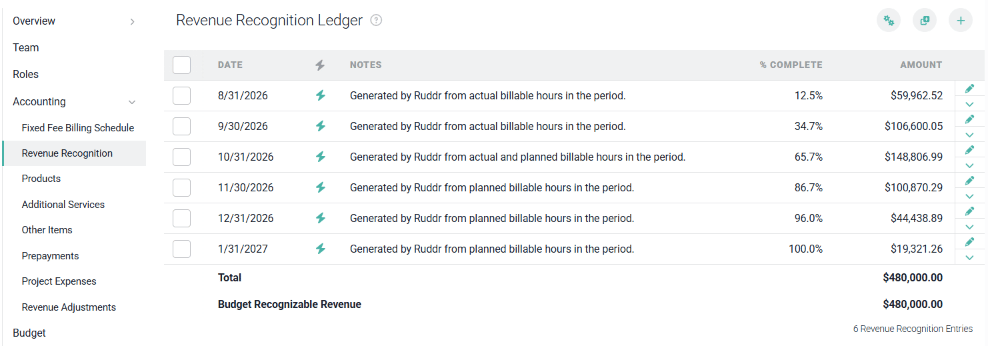
Figure 1 - Revenue Recognition Ledger

Figure 2 - Ruddr Notification when Total of Revenue Recognition Ledger Exceeds Total of Fixed Fee Billing Schedule
Adding Revenue Recognition Ledger Entries
To add revenue recognition ledger entries yourself, click either the + button or the Add Multiple button at the top-right of the ledger. The + button will bring up a window that will allow you to create a single entry in the ledger (Figure 3). This is generally optimal when the revenue recognition will not follow a consistent pattern from month-to-month.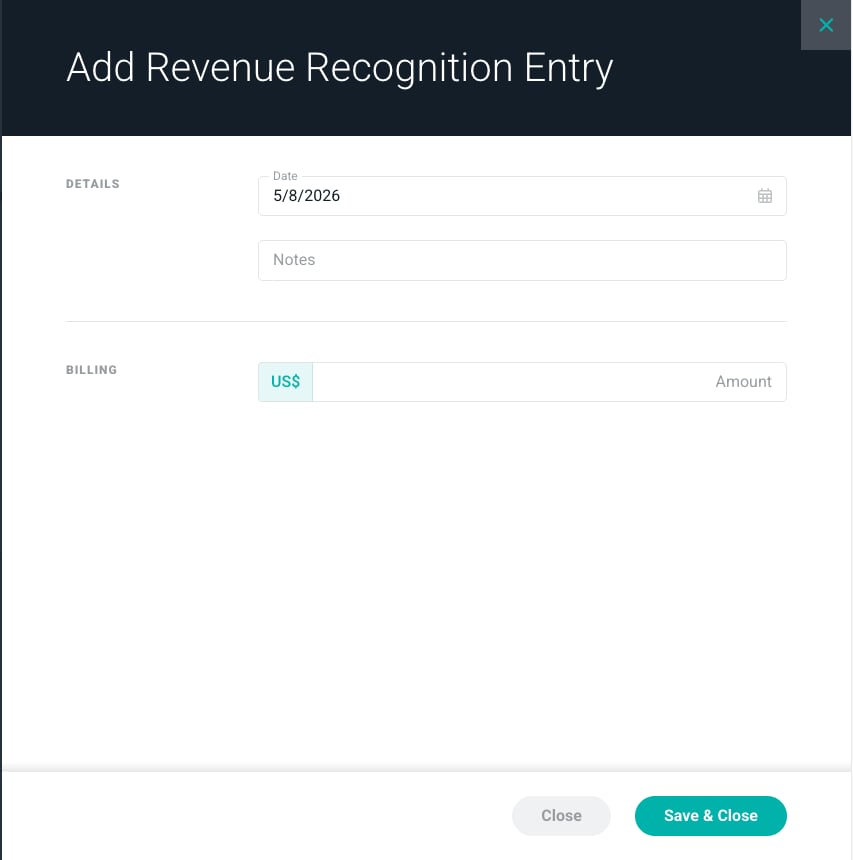
Figure 3 - Add Revenue Recognition Entry
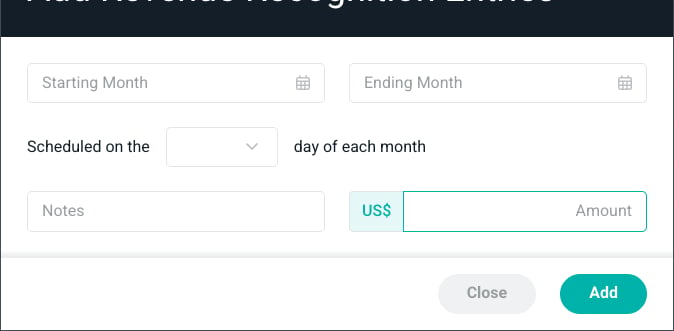
Figure 4 - Add Multiple Revenue Recognition Entries
Generating Revenue Recognition Ledger Entries
Ruddr can automatically generate past and future revenue recognition ledger entries via the Generate button at the top-right of the ledger. The Generate button is only enabled once the project’s budget can back a schedule; hovering over a disabled button will explain what is missing (for example, the project must use a budget or must have a services revenue budget) (Figure 5).
Figure 5 - Hover Over the Disabled Generate Button to See What Is Missing
- The method Ruddr should use to calculate revenue recognition entries
- The interval that entries should be created on (weekly or monthly)
- The start date for when the process should create revenue recognition ledger entries
- The date through which Ruddr should rely on actual hours
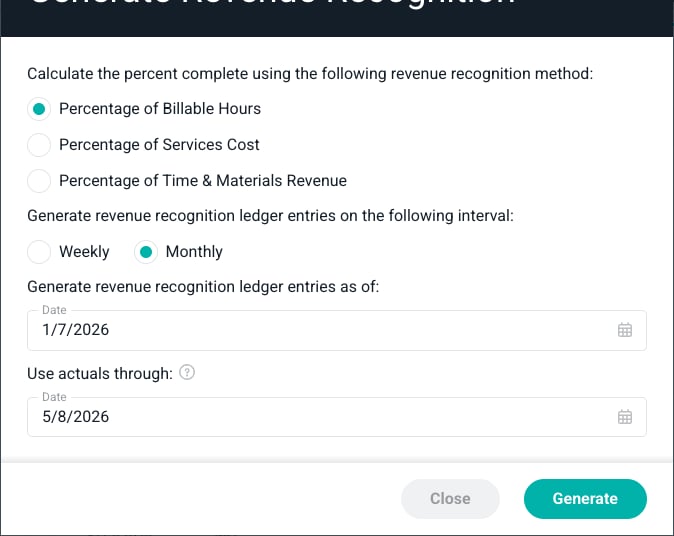
Figure 6 - The Generate Revenue Recognition Window
Automated Revenue Recognition
While adding entries yourself or generating them with the Generate button is often desirable, Ruddr also provides three automated revenue recognition methods. These methods are Automated - Percentage of Billable Hours, Automated - Percentage of Services Cost, and Automated - Percentage of Time & Materials Revenue. With these methods, Ruddr performs automated revenue recognition either once per week or once per month. Ruddr will analyze the project’s actuals and forecast and then make the appropriate entry in the revenue recognition ledger. For more on automated revenue recognition methods, see the Fixed Fee Revenue Recognition article.How Generated Entries Are Calculated
Each entry on the ledger is either Ruddr-generated or member-generated. Entries Ruddr creates, whether from the Generate button, an automated revenue recognition method, or recognizing the remaining revenue when a project is completed, are Ruddr-generated and are marked with a lightning bolt icon. Entries a member adds with the + or Add Multiple button, and Ruddr-generated entries where a member has edited the date or amount, are member-generated. For Ruddr-generated entries that use a percent complete, the % Complete column shows the percent complete behind the amount. Hover over the lightning bolt on a Ruddr-generated entry to see how its amount was calculated. The card shows the revenue recognition method used and when the entry was generated, then breaks the amount down:- Percent complete - the actual values through a date, plus any planned values through the entry’s date, divided by the project’s budget or forecast. Depending on the method, these values are billable hours, Time & Materials revenue, or services cost.
- Revenue earned - the budget services revenue multiplied by the percent complete, plus non-billable expenses when they apply.
- Recognized this entry - the revenue earned minus the revenue previously recognized on the ledger.
Completing a Fixed Fee Project
When a fixed fee project that uses the revenue recognition ledger is set to Completed, Ruddr will check whether all of the project’s scheduled revenue, the total of its fixed fee billing schedule, has been recognized. If it hasn’t, Ruddr will ask whether to add an entry for the remaining amount (Figure 7). If you click Yes, a final Ruddr-generated entry for that amount is added to the revenue recognition ledger.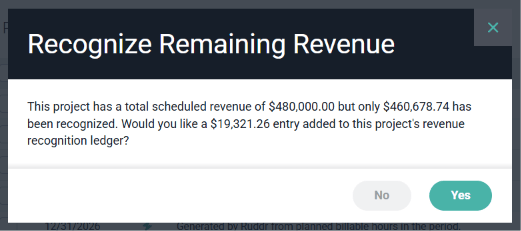
Figure 7 - Ruddr Offers to Recognize the Remaining Revenue when a Project Is Completed