


Figure 1 - Ruddr's Default Options for Time and Expense Approval in the Workspace
- Enabling the feature in Ruddr
- Default workflow for time and for expense in the workspace
- Workflow for a project
- Disabling the feature in Ruddr
Enabling Multi-Step Approval in Ruddr
The Multi-Step Approval feature in Ruddr can be enabled or disabled within the Features section (Figure 2) of workspace Settings. As some organizations may not need or desire to use multi-step approval workflow, Ruddr allows this feature set to be turned off. To enable or disable multi-step approval workflow, simply click the Multi-Step Approval Workflow toggle (Figure 3) on the Features section.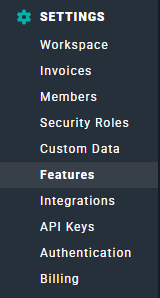
Figure 2 - Access Features from Ruddr Workspace Settings

Figure 3 - Toggle the Multi-Step Approval Workflow Feature On or Off Based on your Organizational Requirements
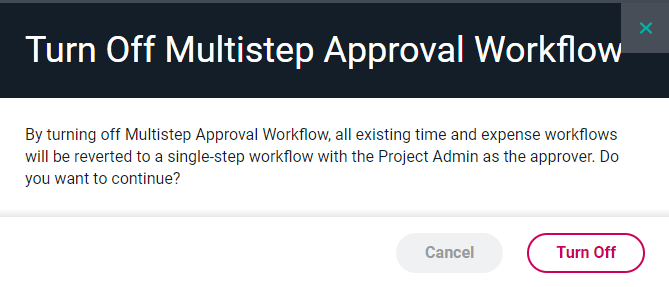
Figure 4 - Ruddr will Prompt for Confirmation when Attempting to Disable the Multi-Step Approval Workflow Feature
Setting the Default Workflow
Once the multi-step approval workflow feature is enabled, you will see a Set Default Workflow button appear in the Project Settings area of workspace settings (Figure 5). Clicking on this button will display an Edit Workflow screen that displays the default, one-step approval (Figure 6) with the Project Admin listed as the sole approver. For more information on working with multi-step workflows, see the Managing Multi-Step Approval Workflows section in Ruddr Help Center.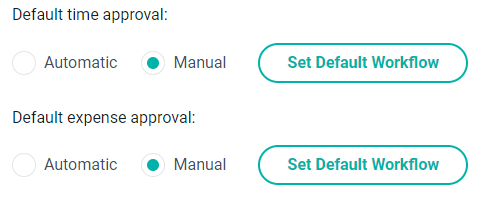
Figure 5 - With the Feature Enabled, you can Set a Default Workflow for the Workspace
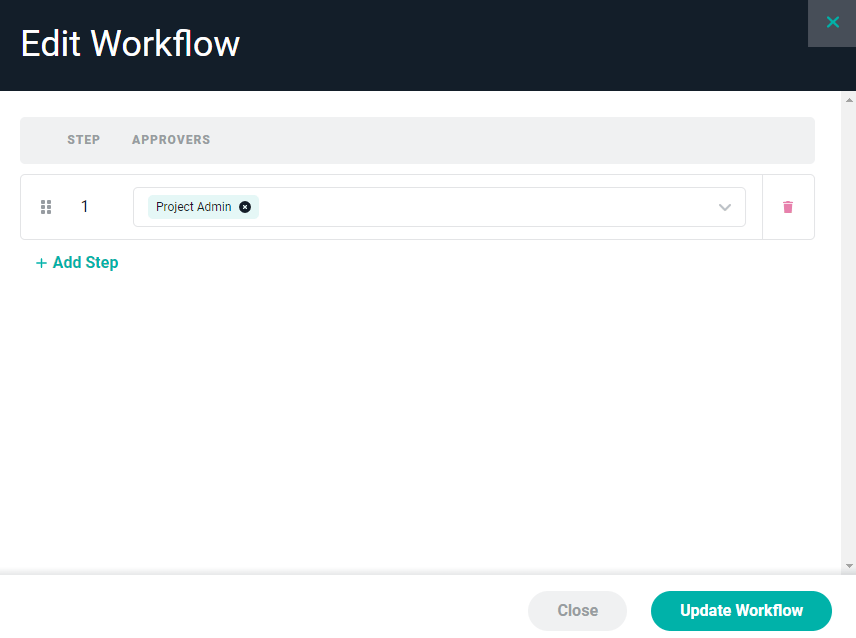
Figure 6 - One-Step Approval Workflow with the Project Admin as Sole Approver