

The two treatments
Legacy treatment. Non-billable expenses were assumed to be covered by the fixed fee. Ruddr subtracted them from services revenue and reported the same amount as expenses revenue. Budgets worked the same way: the non-billable expenses budget counted as expenses revenue, so a $100K project with a $10K non-billable expenses budget needed a $90K services revenue budget to add up to the fee. Automated revenue recognition also added the non-billable expenses to the ledger as they were incurred, up to the non-billable expenses budget. Current treatment. The full fee is services revenue. Non-billable expenses are not revenue, so expenses revenue only contains billable expenses. Where a non-billable expense’s cost goes depends on its expense category:- Categories classified as services, such as work outsourced to a third party, count as services cost, like labor. They reduce the project’s services gross profit and services gross margin, and they count toward progress on a project that recognizes revenue by percentage of services cost.
- Every other category, such as meals or travel, counts as expenses cost.
How legacy projects appear across Ruddr
Every surface calculates a legacy project with the legacy treatment until it is upgraded:- Expense categories: the Classify as services setting is ignored. Every expense on the project is an expense, whatever its category.
- Project and client KPIs: the Effective Rate uses services revenue after the non-billable expenses are subtracted. The Expenses KPI includes every expense, and the Revenue and Margin KPIs count non-billable expenses as expenses revenue.
- Reports and the Executive Dashboard: services revenue, the effective bill rate, and services cost follow the legacy treatment. Performance by Member attributes no expense cost to members, because the project has no services expenses.
- Budgets: the services revenue budget is entered net of the non-billable expenses budget, and the non-billable expenses budget counts as expenses revenue. The ledger’s Budget Recognizable Revenue includes the non-billable expenses budget.
- Revenue recognition: automated revenue recognition adds non-billable expenses to the ledger as they are incurred, up to the non-billable expenses budget. Under percentage of services cost, expenses never count toward progress.
- Invoices and credit notes: grouped invoices never put expenses on a line of their own as services expenses, and credit notes credit every expense as expenses revenue.
How to tell which treatment a project uses
A project on the legacy treatment shows an Upgrade Revenue Treatment button in the Billing section of the project’s Settings tab, under Revenue Attribution Method. Hovering the help icon next to the button explains what the upgrade changes. Projects on the current treatment do not show the button.What the upgrade does
Clicking Upgrade Revenue Treatment opens a confirmation that lists what will change (Figure 1). Confirming does two things: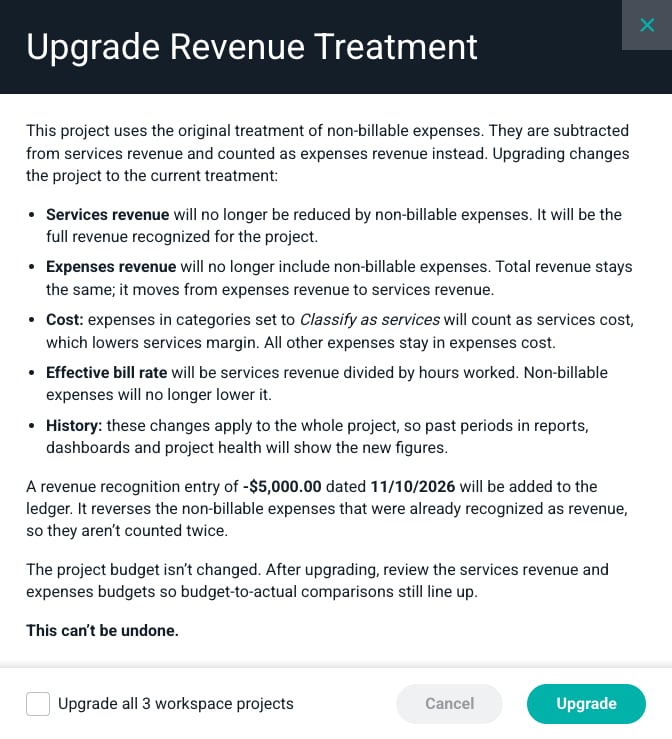
Figure 1 - The Upgrade Revenue Treatment Confirmation
- The project switches to the current treatment. Reports, dashboards, the budget, and future automated revenue recognition use it from then on.
- The revenue recognition ledger is corrected when needed. If the legacy automated revenue recognition added non-billable expenses to the ledger and that took the ledger above the Fixed Fee Billing Schedule, the upgrade adds a manual entry that reverses the excess. The entry is dated today, unless the project’s revenue is recognized on a weekly or monthly schedule. Then it is dated the day before the period the next scheduled run recalculates, so that run does not overwrite it. The confirmation shows the amount and date before you upgrade, and the entry’s calculation panel in the ledger shows the amount reversed. A project that uses “As Invoiced” revenue recognition never gets this entry.
Upgrade every project at once
A workspace admin can upgrade every legacy project in the workspace from the same confirmation. Before clicking Upgrade, check Upgrade all workspace projects at the bottom of the confirmation, which shows how many projects still use the legacy treatment (Figure 1). The checkbox only appears when more than one project needs the upgrade. Each project is upgraded as described above, including its own reversing ledger entry when it needs one. The upgrade runs in the background, so it can take a few minutes for every project to switch. When it finishes, you get an email with the number of projects upgraded and a link to any project that could not be upgraded, so you can upgrade it from its settings.Why upgrade
- Reports and dashboards compare projects on the same basis. A legacy project shows lower services revenue, a higher services margin, and a lower effective bill rate than an identical project on the current treatment.
- The services revenue budget means the same thing as the billing schedule, so the budget recognizable revenue on the ledger equals the fee.
- Outsourced delivery work appears where it belongs, as a cost of delivering the project.