All hours in Ruddr fall into one of two main categories which are Time Off Hours and Project Hours. Within the Project Hours category, each time entry is either Client Billable, Client Non-Billable, or Internal. All internal hours are always non-billable. Internal hours are non-billable project hours associated with the “Internal Client”. Each workspace has a special client called the Internal Client that can be used for internal projects. Projects associated with the Internal Client can only be non-billable.Documentation Index
Fetch the complete documentation index at: https://help.ruddr.io/llms.txt
Use this file to discover all available pages before exploring further.

- Client Billable Hours
- Client Non-Billable Hours
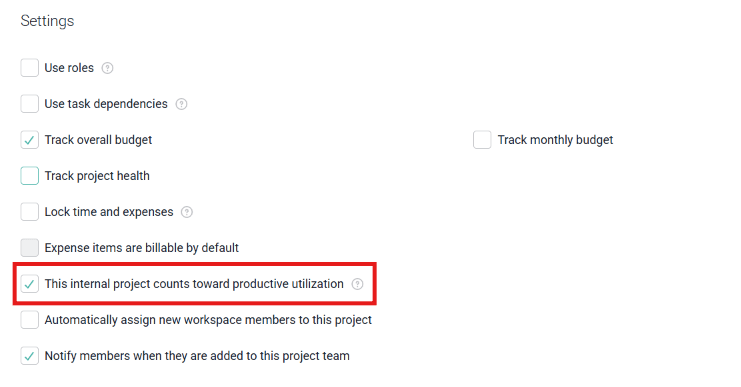
- Internal Hours on projects with the “Time is attributable to Productive Utilization” setting checked.
Figure 2 - Productive Utilization setting on internal projects.
This setting on internal projects allows you to differentiate between strategic internal work (such as building a new project estimation tool or working on the new company website) and potentially less-valuable “bench time” projects.
Productive Utilization
Billable utilization in Ruddr is calculated by dividing the billable hours in the period by the capacity hours in the period. So, if a workspace member had 20 billable hours last week, 20 non-billable internal hours, and 40 hours of capacity, the billable utilization would be 50% (20 billable hours divided by 40 hours of capacity).
But, let’s assume that 10 of those 20 internal hours were on a strategic project that has the “Time is attributable to Productive Utilization” setting checked. While the billable utilization would remain 50%, the productive utilization would be 75% (30 productive hours divided by 40 hours of capacity).
Productive Utilization is shown to workspace members on the Personal Dashboard, along with Billable Utilization, Client Utilization, and Total Utilization.