

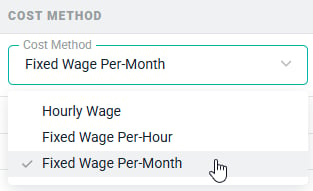
Figure 1 - Available Cost Methods
- Hourly Wage - This method is designed for members who are paid hourly, including contractors and hourly employees.
- Fixed Wage Per-Hour - This method is designed for members who are paid for the number of hours of capacity the member has during the period, not the number of actual hours recorded during the period.
- Fixed Wage Per-Month - This method is based on the monthly salary of the member, not the number of capacity hours or actual hours recorded during the month. This is the most common method used for fulltime employees.
Member Performance Reporting
To show how the distinct labor cost methods impact member-based performance, let’s assume we have three employees that each work 200 hours on a project during a given month. Those are the only hours recorded by those members during the month. The members each have eight hours of capacity on business days (Monday through Friday) and there are 22 business days during the month (thus 176 hours of capacity during the month). Each project team member has a different labor cost method, as described below:- Member A - Hourly Wage labor cost method at $50 per hour.
- Member B - Fixed Wage Per-Hour labor cost method at $50 per hour.
- Member C - Fixed Wage Per Month labor cost method at $9,000 per month.
- Member A - With the Hourly Wage method, every hour recorded by the member would impact their cost on any member-based performance report. Thus, Member A’s cost for the given month would be 200 hours * $50 = $10,000.
- Member B - With the Fixed Wage Per-Hour method, the member’s total cost for the period is based on capacity hours in the month and not on recorded hours. Thus, Member B’s cost would be 22 days * 8 hours of capacity * $50 = $8,800.
- Member C - With the Fixed Wage Per-Month method, the member’s total cost for the period is the member’s monthly salary/wage. Neither the capacity hours nor the recorded hours impact the the member’s cost for the period. Thus, Member C’s cost would be $9,000.
Project Performance Reporting
There is an important distinction with project-based performance reporting in that projects incur cost for every hour recorded against them. Let’s assume we have the exact same scenario as described above but we want to evaluate the cost incurred by the project (and not the member).- Member A - With the Hourly Wage method, the cost for Member A’s time would be 200 hours * $50 = $10,000. Note that this is identical to Member A’s member-based cost from the example above.
- Member B - With the Fixed Wage Per-Hour method, the project is charged for every hour worked. Thus, Member B’s cost incurred by the project would also be 200 hours * $50 = $10,000.
- Member C - With the Fixed Wage Per-Month method, Ruddr must first calculate an hourly rate for the given month based on the monthly salary. In this case, the salary is $9,000 and there are 176 hours of capacity which yields a cost rate of $51.1363 per hour. The member worked 200 hours in the month and thus the total cost is 200 * $51.1363 = $10,227.27.