> ## Documentation Index
> Fetch the complete documentation index at: https://help.ruddr.io/llms.txt
> Use this file to discover all available pages before exploring further.
# Edit Project Permissions
A [security role](/workspace-administration/security-roles) that can edit projects doesn't have to be able to edit everything about them. Project editing is broken into three sections, and you choose which ones a role can edit:
* **Standard** - the project's general information, such as its name, dates, status, team, tasks, and notes.
* **Billing & Accounting** - anything that drives the revenue or cost of the project, including bill rates, the invoice details, and the accounting ledgers.
* **Budget** - the project's overall and monthly budgets.
This lets you give a delivery lead everything they need to run a project day to day while keeping the commercial terms in the hands of finance. Members can still see the information in the sections they can't edit, so nothing disappears from the project as a result of these settings.
## Grant Editable Sections
Click on **Settings** in the nav bar, select the **Security Roles** option, and then click the name of the role you want to change. In the **Project Permissions** section of the role, choose the projects the role can edit under **Edit these projects**, and then choose the sections it can edit under **Editable sections** (Figure 1).
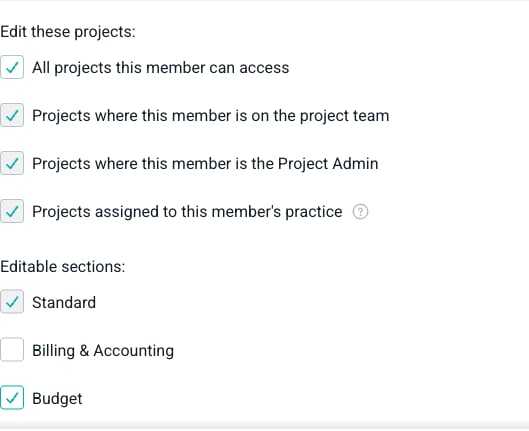 Figure 1 - The **Editable sections** options for a role that can edit budgets but not billing information
A few things to know about these options:
* **Standard** is checked automatically as soon as the role can edit any projects, and it cannot be unchecked. A role that can edit a project can always edit its general information.
* **Billing & Accounting** and **Budget** are optional, and you can grant either one or both.
* The **Editable sections** options are unavailable until you grant the role at least one project edit permission under **Edit these projects**. Sections have nothing to apply to until the role can edit a project.
* The built-in Workspace Admin role has all three sections, and like the rest of that role, they cannot be changed.
Your existing security roles are unaffected by this change. Every role that could already edit projects has all three sections, so those members keep editing exactly what they could edit before until you remove a section.
## What Each Section Covers
The sections apply to the **Settings** tab of a project. Each part of that tab belongs to exactly one section.
### Standard
The Standard section covers the general information about the project:
* The **Basic Information**, **Settings**, **Time Tracking Rules**, **Approval Options**, and **Cloud Folder** sections of the **Overview** tab, including the project name, practice, business unit, sales representative, [project status](/projects/project-status), project type, start and end dates, project code, tags, and notes.
* The [project team](/projects/project-team), including who is on it and who the [Project Admin](/projects/the-project-admin) is.
* [Project tasks](/projects/project-tasks) and [project roles](/projects/project-roles), apart from their billing settings and rates.
### Billing & Accounting
The Billing & Accounting section covers anything that affects the revenue or cost of the project:
* The **Billing** section of the **Overview** tab, including the currency, [billing type](/projects/billing-types), PO number, purchase order, revenue recognition method, revenue attribution method, and accounting notes.
* The **Invoice Details** section of the **Overview** tab, including the invoice recipients, street address, payment terms, tax rate, taxable items, and the invoice and email templates.
* [Bill rates](/projects/project-bill-rates) on project roles and project team members, and whether a project role or task is billable.
* The ledgers on the **Accounting** tab: the [products ledger](/projects/products-ledger), [additional services ledger](/projects/additional-services-ledger), [other items ledger](/projects/other-items-ledger), [project expenses ledger](/projects/project-expenses-ledger), [revenue recognition ledger](/projects/the-revenue-recognition-ledger), [earned revenue adjustment ledger](/projects/earned-revenue-adjustment-ledger), and the [fixed fee billing schedule](/projects/fixed-fee-billing-schedule).
### Budget
The Budget section covers the [project budget](/projects/create-a-project-budget) and the monthly budget:
* Whether the project tracks an overall budget and a monthly budget, and the budget type.
* The services revenue, billable and non-billable hours, expense budgets, products, additional services, and other items budgets.
* The revenue, hours, and expense caps.
* The target services gross margin and the markup settings.
* The budget hours and revenue alert thresholds.
* The hours budgeted for individual team members and tasks.
Labor cost overrides for a project team member are not part of these sections. Those continue to require the **Administer all workspace settings and members** permission, and viewing them requires the **View profit** project permission.
## How Read-Only Sections Look
These sections control editing only. A member who can edit a project can still view every field on the **Settings** tab, including the fields in sections their role cannot edit.
Where an entire section is read-only, its fields are greyed out and the **Save** button is removed (Figure 2). The values are still there to read.
Figure 1 - The **Editable sections** options for a role that can edit budgets but not billing information
A few things to know about these options:
* **Standard** is checked automatically as soon as the role can edit any projects, and it cannot be unchecked. A role that can edit a project can always edit its general information.
* **Billing & Accounting** and **Budget** are optional, and you can grant either one or both.
* The **Editable sections** options are unavailable until you grant the role at least one project edit permission under **Edit these projects**. Sections have nothing to apply to until the role can edit a project.
* The built-in Workspace Admin role has all three sections, and like the rest of that role, they cannot be changed.
Your existing security roles are unaffected by this change. Every role that could already edit projects has all three sections, so those members keep editing exactly what they could edit before until you remove a section.
## What Each Section Covers
The sections apply to the **Settings** tab of a project. Each part of that tab belongs to exactly one section.
### Standard
The Standard section covers the general information about the project:
* The **Basic Information**, **Settings**, **Time Tracking Rules**, **Approval Options**, and **Cloud Folder** sections of the **Overview** tab, including the project name, practice, business unit, sales representative, [project status](/projects/project-status), project type, start and end dates, project code, tags, and notes.
* The [project team](/projects/project-team), including who is on it and who the [Project Admin](/projects/the-project-admin) is.
* [Project tasks](/projects/project-tasks) and [project roles](/projects/project-roles), apart from their billing settings and rates.
### Billing & Accounting
The Billing & Accounting section covers anything that affects the revenue or cost of the project:
* The **Billing** section of the **Overview** tab, including the currency, [billing type](/projects/billing-types), PO number, purchase order, revenue recognition method, revenue attribution method, and accounting notes.
* The **Invoice Details** section of the **Overview** tab, including the invoice recipients, street address, payment terms, tax rate, taxable items, and the invoice and email templates.
* [Bill rates](/projects/project-bill-rates) on project roles and project team members, and whether a project role or task is billable.
* The ledgers on the **Accounting** tab: the [products ledger](/projects/products-ledger), [additional services ledger](/projects/additional-services-ledger), [other items ledger](/projects/other-items-ledger), [project expenses ledger](/projects/project-expenses-ledger), [revenue recognition ledger](/projects/the-revenue-recognition-ledger), [earned revenue adjustment ledger](/projects/earned-revenue-adjustment-ledger), and the [fixed fee billing schedule](/projects/fixed-fee-billing-schedule).
### Budget
The Budget section covers the [project budget](/projects/create-a-project-budget) and the monthly budget:
* Whether the project tracks an overall budget and a monthly budget, and the budget type.
* The services revenue, billable and non-billable hours, expense budgets, products, additional services, and other items budgets.
* The revenue, hours, and expense caps.
* The target services gross margin and the markup settings.
* The budget hours and revenue alert thresholds.
* The hours budgeted for individual team members and tasks.
Labor cost overrides for a project team member are not part of these sections. Those continue to require the **Administer all workspace settings and members** permission, and viewing them requires the **View profit** project permission.
## How Read-Only Sections Look
These sections control editing only. A member who can edit a project can still view every field on the **Settings** tab, including the fields in sections their role cannot edit.
Where an entire section is read-only, its fields are greyed out and the **Save** button is removed (Figure 2). The values are still there to read.
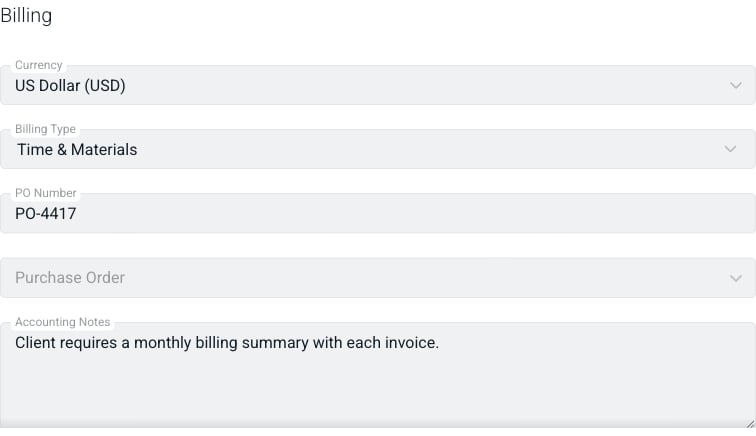 Figure 2 - The **Billing** section for a member whose role does not include Billing & Accounting
On the **Accounting** tab, each ledger lists its entries and totals as usual, but the buttons for adding entries and the actions for editing and deleting them are not shown (Figure 3).
Figure 2 - The **Billing** section for a member whose role does not include Billing & Accounting
On the **Accounting** tab, each ledger lists its entries and totals as usual, but the buttons for adding entries and the actions for editing and deleting them are not shown (Figure 3).
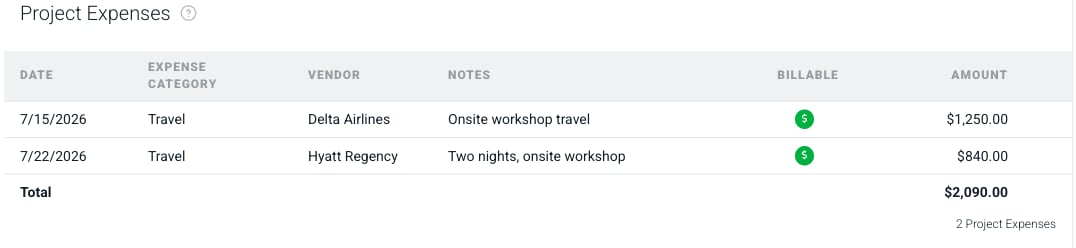 Figure 3 - The project expenses ledger for a member whose role does not include Billing & Accounting
Where a single field belongs to another section, only that field is greyed out and the rest of the form still works. In Figure 4, the member can rename the project role and change its discipline and member assignments, but the **Rate** is read-only because it belongs to Billing & Accounting.
Figure 3 - The project expenses ledger for a member whose role does not include Billing & Accounting
Where a single field belongs to another section, only that field is greyed out and the rest of the form still works. In Figure 4, the member can rename the project role and change its discipline and member assignments, but the **Rate** is read-only because it belongs to Billing & Accounting.
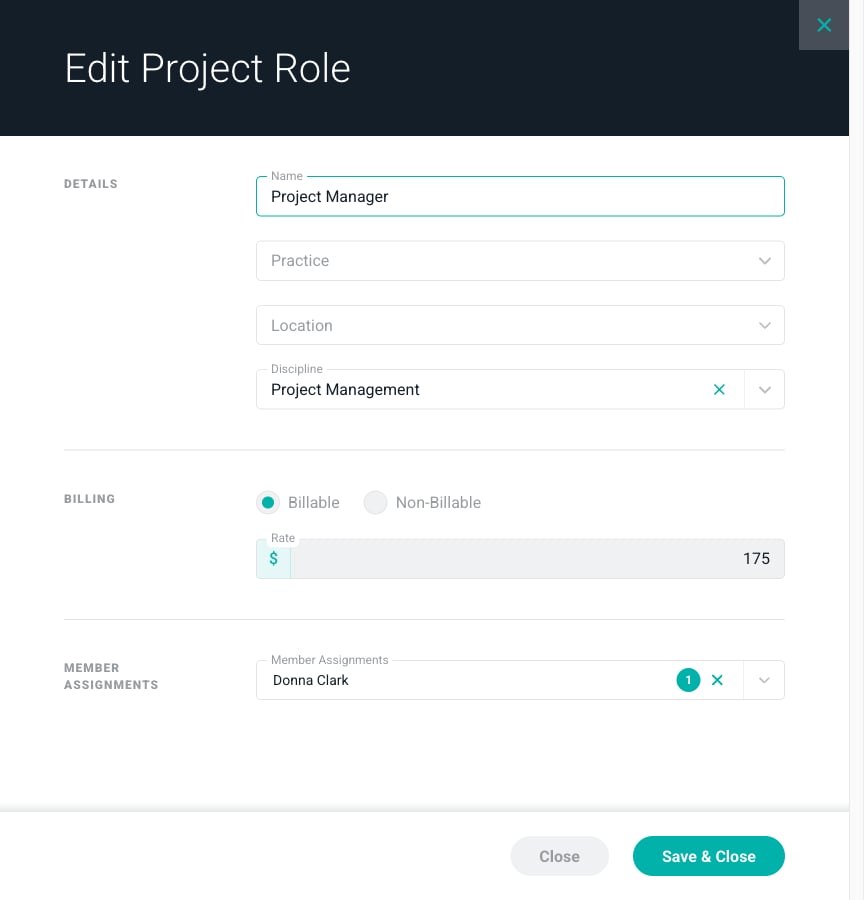 Figure 4 - The bill rate on a project role is read-only while the rest of the role can still be edited
The **Budget** and **Monthly Budget** tabs work a little differently because their fields are edited in a drawer. A member whose role includes the Budget section sees the edit icon at the top-right of the tab (Figure 5).
Figure 4 - The bill rate on a project role is read-only while the rest of the role can still be edited
The **Budget** and **Monthly Budget** tabs work a little differently because their fields are edited in a drawer. A member whose role includes the Budget section sees the edit icon at the top-right of the tab (Figure 5).
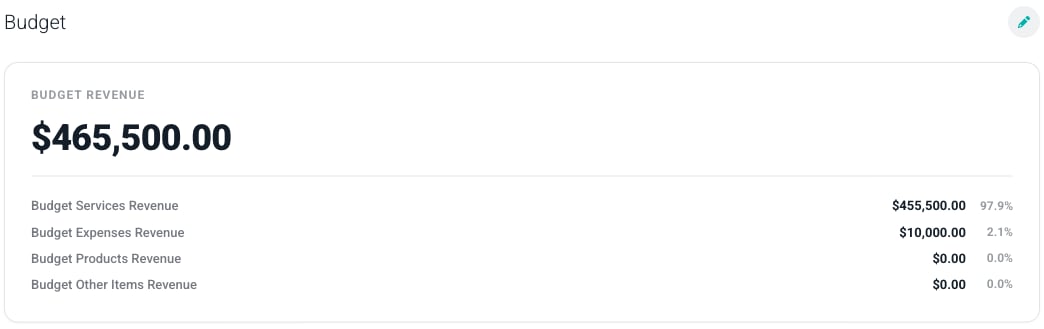 Figure 5 - The **Budget** tab for a member whose role includes the Budget section
Without the Budget section, the tab is a read-only dashboard of the saved budget and the edit icon is not shown (Figure 6).
Figure 5 - The **Budget** tab for a member whose role includes the Budget section
Without the Budget section, the tab is a read-only dashboard of the saved budget and the edit icon is not shown (Figure 6).
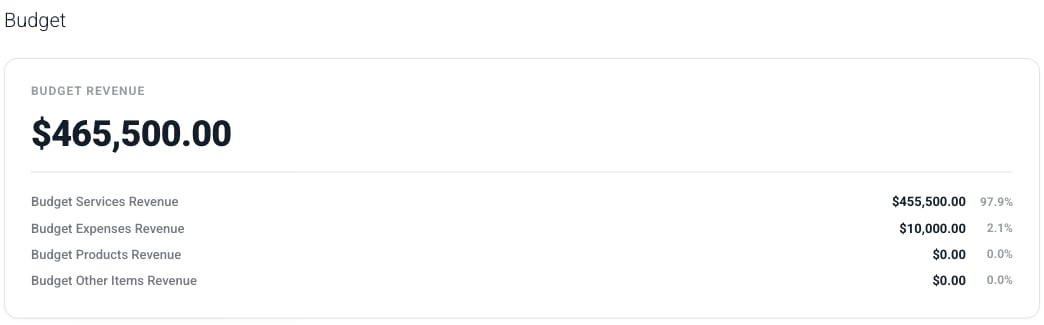 Figure 6 - The same **Budget** tab for a member whose role does not include the Budget section
## Related Permissions
Granting a project edit permission still grants **View bill rates** and **View revenue** for those projects, exactly as it did before. Editable sections do not change what a role can view, so a role that can edit only the general information about a project can still see its rates, revenue, budget, and ledgers.
The reverse is also worth keeping in mind. Adding **Billing & Accounting** or **Budget** to a role has no effect unless the role can also edit the project in the first place, and it never grants access to a project the role could not already reach. For the full picture of how project access and project actions fit together, see [Project Permissions](/workspace-administration/security-roles#project-permissions).
Figure 6 - The same **Budget** tab for a member whose role does not include the Budget section
## Related Permissions
Granting a project edit permission still grants **View bill rates** and **View revenue** for those projects, exactly as it did before. Editable sections do not change what a role can view, so a role that can edit only the general information about a project can still see its rates, revenue, budget, and ledgers.
The reverse is also worth keeping in mind. Adding **Billing & Accounting** or **Budget** to a role has no effect unless the role can also edit the project in the first place, and it never grants access to a project the role could not already reach. For the full picture of how project access and project actions fit together, see [Project Permissions](/workspace-administration/security-roles#project-permissions).