> ## Documentation Index
> Fetch the complete documentation index at: https://help.ruddr.io/llms.txt
> Use this file to discover all available pages before exploring further.
# Pipeline Reports
For workspaces that utilize the Pipeline feature in Ruddr, the Pipeline report section is available and provides insight into opportunities.
You can access the Pipeline reports section of Ruddr by clicking the **Reports** item in the main nav bar (Figure 1) on the left of the screen. Once you have accessed the reports library, you will see the Pipeline category of reports listed (Figure 2).
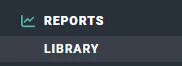 Figure 1 - Clicking on **Reports** in the Main Nav Bar to Access the Reports Library
 Figure 2 - Pipeline Reports in the Report Library
The following reports present differing views of pipeline data in your workspace:
#### Opportunity Detail
A list of opportunities in Ruddr, including:
* Name
* Client and Project
* Stage
* Created Date
* Expected Close Date
* Probability
* Amount
* Weighted Amount
#### Opportunities by Month
A summary of opportunities created per month and opportunities expected to close by month. This report includes a graphical representation of pipeline amount over time. Reported data includes:
* \# Opportunities Created
* \# Opportunities Closing
* Weighted Amount Created
* Gross Amount Created
* Weighted Amount Closing
* Gross Amount Closing
Figure 2 - Pipeline Reports in the Report Library
The following reports present differing views of pipeline data in your workspace:
#### Opportunity Detail
A list of opportunities in Ruddr, including:
* Name
* Client and Project
* Stage
* Created Date
* Expected Close Date
* Probability
* Amount
* Weighted Amount
#### Opportunities by Month
A summary of opportunities created per month and opportunities expected to close by month. This report includes a graphical representation of pipeline amount over time. Reported data includes:
* \# Opportunities Created
* \# Opportunities Closing
* Weighted Amount Created
* Gross Amount Created
* Weighted Amount Closing
* Gross Amount Closing