> ## Documentation Index
> Fetch the complete documentation index at: https://help.ruddr.io/llms.txt
> Use this file to discover all available pages before exploring further.
# The Revenue Recognition Ledger
With Time & Materials projects, revenue is recognized on reports and dashboards as of the date of each billable time entry. But, with Fixed Fee projects, revenue is recognized based on the fixed fee revenue recognition method set for each project. The revenue recognition method options available for fixed fee projects include:
* As Invoiced
* Manual
* Automated - Percentage of Billable Hours
* Automated - Percentage of Time & Materials Revenue
* Automated - Percentage of Services Cost
A detailed discussion of each of these methods is included in the [Fixed Fee Revenue Recognition](/projects/fixed-fee-revenue-recognition) article. The "As Invoiced" method recognizes revenue as of the Issue Date of the published invoice that includes one or more billing milestones. The other three revenue recognition methods recognize revenue based on entries in the **Revenue Recognition Ledger** on the **Accounting** tab of the **Edit Project** drawer. The revenue recognition ledger (Figure 1) tells Ruddr when to recognize revenue and how much revenue to recognize. Note that projects using the "As Invoiced" revenue recognition method do not show this ledger.
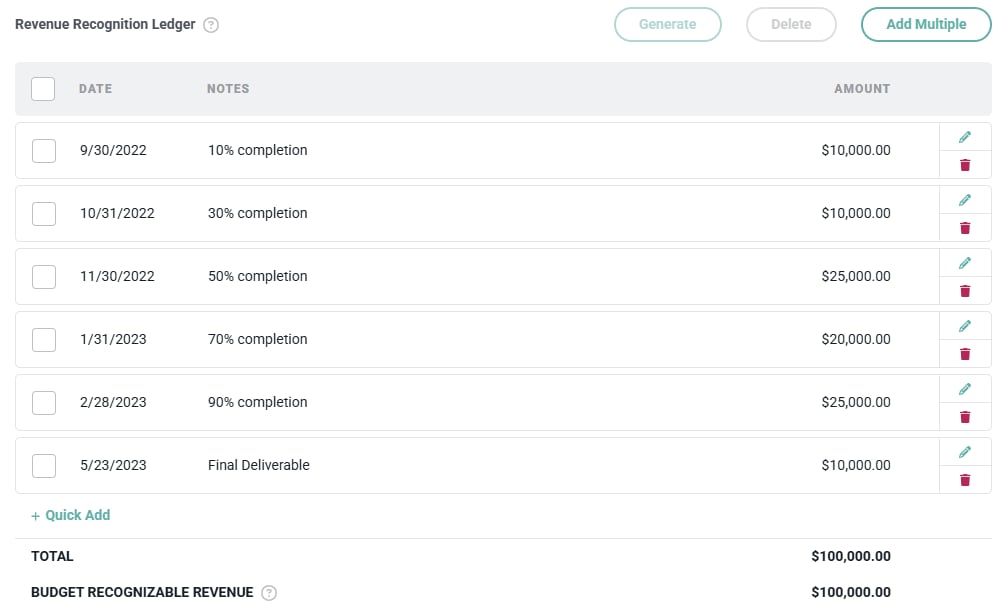 Figure 1 - Revenue Recognition Ledger
It is important to point out that fixed fee projects that use the revenue recognition ledger have their invoicing and revenue recognition completely separated. Invoicing is driven by the **Fixed Fee Billing Schedule** while revenue recognition is driven by the **Revenue Recognition Ledger**. This is an important concept because you may need to recognize revenue on a very different schedule than you invoice.
As an example, assume that your company sells a \$100,000 project and the contract states that 50% of the fee will be invoiced up front and 50% will be invoiced one month after the project is completed. In that scenario, you invoice the client \$50,000 today, even though you may not start the project until next month. Then, you invoice the final 50% one month after the project has been fully delivered. If you recognize the revenue as it is invoiced, your performance reports in Ruddr will show \$50,000 in two months in which your team did none of the project work. This inflates gross profit and gross margin in those two months and depresses them in the remaining months.
Note that the ledger will display the total of the ledger entries and also the **Budget Recognizable Revenue**, which is services revenue budget plus the non-billable expenses budget. It does not include billable expenses or other items to bill.
When the total of the revenue recognition ledger exceeds either the total of the fixed fee billing schedule or the budget recognizable revenue, Ruddr will display a notification warning (Figure 2) of such.
Figure 1 - Revenue Recognition Ledger
It is important to point out that fixed fee projects that use the revenue recognition ledger have their invoicing and revenue recognition completely separated. Invoicing is driven by the **Fixed Fee Billing Schedule** while revenue recognition is driven by the **Revenue Recognition Ledger**. This is an important concept because you may need to recognize revenue on a very different schedule than you invoice.
As an example, assume that your company sells a \$100,000 project and the contract states that 50% of the fee will be invoiced up front and 50% will be invoiced one month after the project is completed. In that scenario, you invoice the client \$50,000 today, even though you may not start the project until next month. Then, you invoice the final 50% one month after the project has been fully delivered. If you recognize the revenue as it is invoiced, your performance reports in Ruddr will show \$50,000 in two months in which your team did none of the project work. This inflates gross profit and gross margin in those two months and depresses them in the remaining months.
Note that the ledger will display the total of the ledger entries and also the **Budget Recognizable Revenue**, which is services revenue budget plus the non-billable expenses budget. It does not include billable expenses or other items to bill.
When the total of the revenue recognition ledger exceeds either the total of the fixed fee billing schedule or the budget recognizable revenue, Ruddr will display a notification warning (Figure 2) of such.
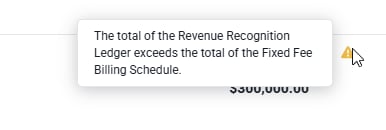 Figure 2 - Ruddr Notification when Total of Revenue Recognition Ledger Exceeds Total of Fixed Fee Billing Schedule
Entries on the revenue recognition ledger can be added [manually](#manually-adding-revenue-recognition-ledger-entries) or can be [generated](#01JC1QMYC16M5Q8T7R54QRKTA7) by Ruddr.
### Manually Adding Revenue Recognition Ledger Entries
Revenue recognition ledger entries can be created manually by clicking either clicking the **Quick Add** button at the bottom of the ledger or the **Add Multiple** button at the top of the ledger. The Quick Add button will bring up a window that will allow you to create a single entry in the ledger (Figure 3). This is generally optimal when the revenue recognition will not follow a consistent pattern from month-to-month.
Figure 2 - Ruddr Notification when Total of Revenue Recognition Ledger Exceeds Total of Fixed Fee Billing Schedule
Entries on the revenue recognition ledger can be added [manually](#manually-adding-revenue-recognition-ledger-entries) or can be [generated](#01JC1QMYC16M5Q8T7R54QRKTA7) by Ruddr.
### Manually Adding Revenue Recognition Ledger Entries
Revenue recognition ledger entries can be created manually by clicking either clicking the **Quick Add** button at the bottom of the ledger or the **Add Multiple** button at the top of the ledger. The Quick Add button will bring up a window that will allow you to create a single entry in the ledger (Figure 3). This is generally optimal when the revenue recognition will not follow a consistent pattern from month-to-month.
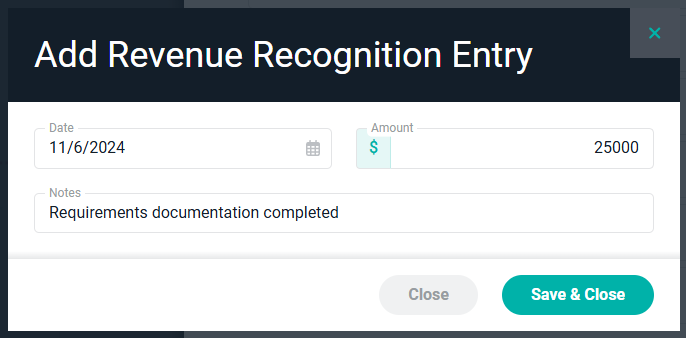 Figure 3 - Add Revenue Recognition Entry
Note that revenue recognition entries can be positive or negative. If you had previously recognized too much revenue on a project and did not want to adjust past revenue recognition entries, you could create a negative revenue recognition entry for the current month.
In cases where the project will recognize the same amount of revenue over a number of months, the **Add Multiple** button will allow you to easily create many monthly revenue recognition entries with a single action. For projects that span several years, this bulk action can save a tremendous amount of time.
Figure 3 - Add Revenue Recognition Entry
Note that revenue recognition entries can be positive or negative. If you had previously recognized too much revenue on a project and did not want to adjust past revenue recognition entries, you could create a negative revenue recognition entry for the current month.
In cases where the project will recognize the same amount of revenue over a number of months, the **Add Multiple** button will allow you to easily create many monthly revenue recognition entries with a single action. For projects that span several years, this bulk action can save a tremendous amount of time.
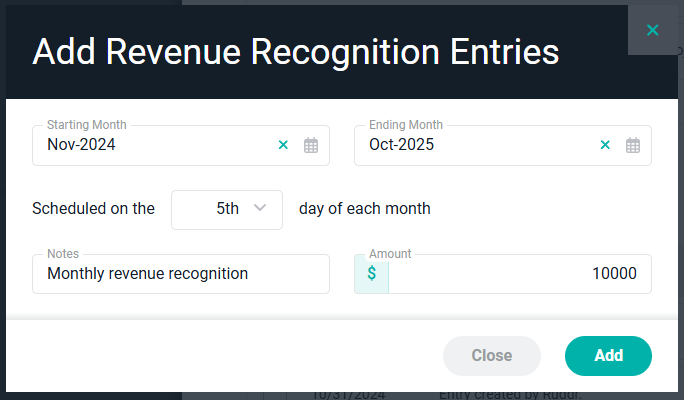 Figure 4 - Add Multiple Revenue Recognition Entries
### Generating Revenue Recognition Ledger Entries
Ruddr can automatically generate past and future revenue recognition ledger entries via the **Generate** button at the top of the ledger. The Generate button evaluates project actuals through the previous day and forecasted values from today forward to create revenue recognition entries. The button brings up the **Generate Revenue Recognition** window which captures four important pieces of information:
* The method Ruddr should use to calculate revenue recognition entries
* The interval that entries should be created on (weekly or monthly)
* The start date for when the process should create revenue recognition ledger entries
* The date through which Ruddr should rely on actual hours
Figure 4 - Add Multiple Revenue Recognition Entries
### Generating Revenue Recognition Ledger Entries
Ruddr can automatically generate past and future revenue recognition ledger entries via the **Generate** button at the top of the ledger. The Generate button evaluates project actuals through the previous day and forecasted values from today forward to create revenue recognition entries. The button brings up the **Generate Revenue Recognition** window which captures four important pieces of information:
* The method Ruddr should use to calculate revenue recognition entries
* The interval that entries should be created on (weekly or monthly)
* The start date for when the process should create revenue recognition ledger entries
* The date through which Ruddr should rely on actual hours
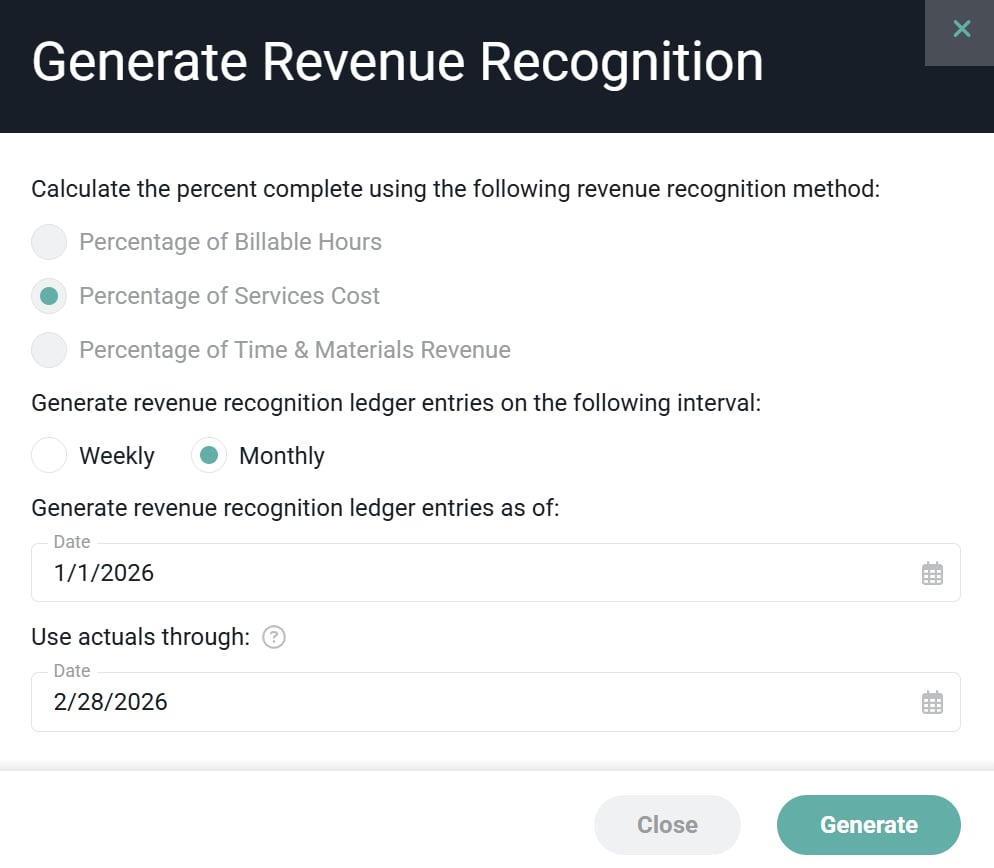 Figure 5 - Add Multiple Revenue Recognition Entries
For detailed information on how the **Percentage of Billable Hours, Percentage of Time & Materials Revenue**, and **Percentage of Services Cost** methods calculate revenue recognition ledger entries, see the the [Fixed Fee Revenue Recognition](/projects/fixed-fee-revenue-recognition) article.
The Generate button will create revenue recognition entries through the end of the resource allocations for the project. Thus, the ledger could contain many months of future revenue recognition entries. Those future entries are used on reports and dashboards that display forecasted services revenue.
### Automated Revenue Recognition
While calculating revenue recognition manually or via the Generate button is often desirable, Ruddr also provides three automated revenue recognition methods. These methods are **Automated - Percentage of Billable Hours**, **Automated - Percentage of Services Cost**, and **Automated - Percentage of Time & Materials Revenue**.
With these methods, Ruddr performs automated revenue recognition either once per week or once per month. Ruddr will analyze the project's actuals and forecast and then make the appropriate entry in the revenue recognition ledger. For more on automated revenue recognition methods, see the [Fixed Fee Revenue Recognition](/projects/fixed-fee-revenue-recognition) article.
### Completing a Fixed Fee Project
When a fixed fee project that uses the revenue recognition ledger is set to Completed, Ruddr will check to see if there is any remaining services revenue budget to be recognized. If there is, Ruddr will ask the user if it should recognize that remaining revenue (Figure 5). If the user confirms, a final revenue recognition row will be added to the revenue recognition ledger.
Figure 5 - Add Multiple Revenue Recognition Entries
For detailed information on how the **Percentage of Billable Hours, Percentage of Time & Materials Revenue**, and **Percentage of Services Cost** methods calculate revenue recognition ledger entries, see the the [Fixed Fee Revenue Recognition](/projects/fixed-fee-revenue-recognition) article.
The Generate button will create revenue recognition entries through the end of the resource allocations for the project. Thus, the ledger could contain many months of future revenue recognition entries. Those future entries are used on reports and dashboards that display forecasted services revenue.
### Automated Revenue Recognition
While calculating revenue recognition manually or via the Generate button is often desirable, Ruddr also provides three automated revenue recognition methods. These methods are **Automated - Percentage of Billable Hours**, **Automated - Percentage of Services Cost**, and **Automated - Percentage of Time & Materials Revenue**.
With these methods, Ruddr performs automated revenue recognition either once per week or once per month. Ruddr will analyze the project's actuals and forecast and then make the appropriate entry in the revenue recognition ledger. For more on automated revenue recognition methods, see the [Fixed Fee Revenue Recognition](/projects/fixed-fee-revenue-recognition) article.
### Completing a Fixed Fee Project
When a fixed fee project that uses the revenue recognition ledger is set to Completed, Ruddr will check to see if there is any remaining services revenue budget to be recognized. If there is, Ruddr will ask the user if it should recognize that remaining revenue (Figure 5). If the user confirms, a final revenue recognition row will be added to the revenue recognition ledger.
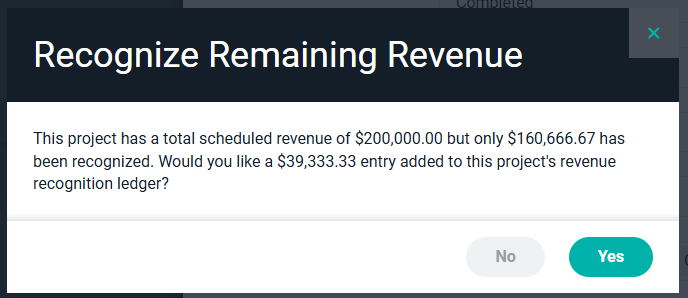 Figure 6 - Automated Revenue Recognition Schedule